


QR & Barcode Scanner
4.862.01K Reviews
App Specs
- Version
- Varies with Device
- Updated On
- License
- Free
- Downloads
- 500,000,000+
- Developer
- Gamma Play
- Categories
- Tools
- Platform
- Android, iOS
Screenshots
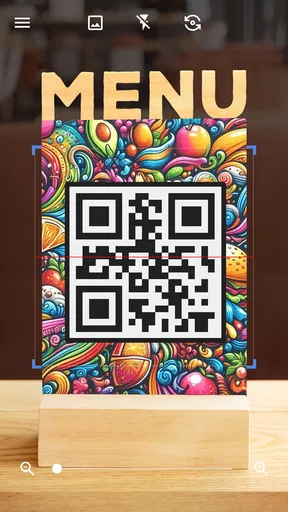
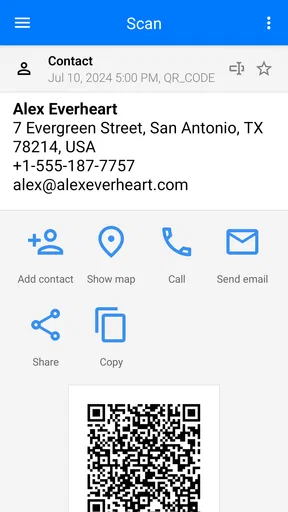
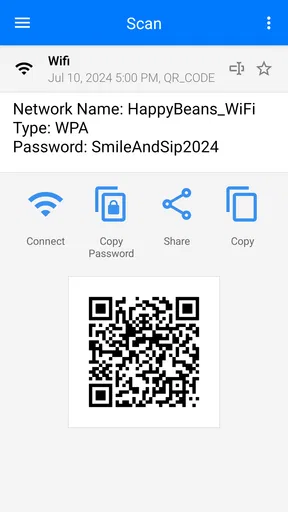
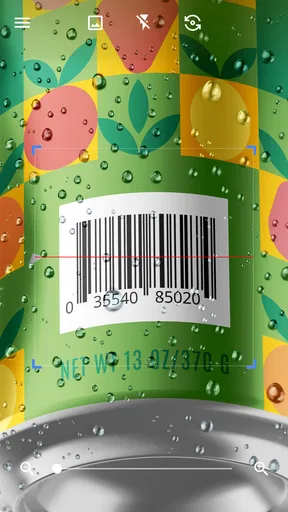
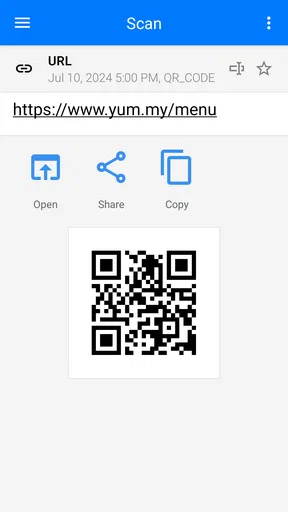
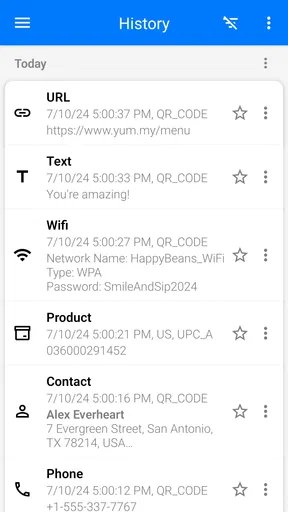
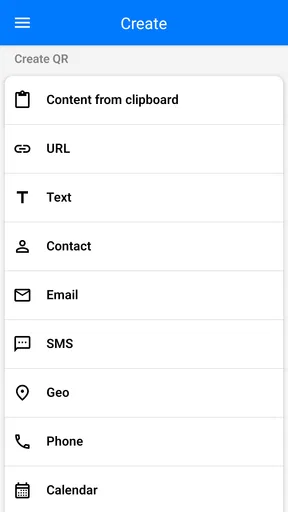
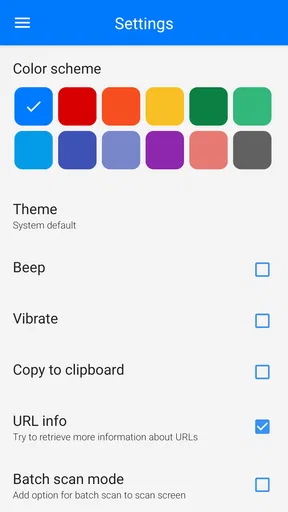
 Analysis by AppCompare
In a shared home, a QR scanner often gets used in small, practical bursts: one person scans a parcel label, another opens a menu, and someone else checks a product while shopping. I like that QR & Barcode Scanner is a focused tools app from Gamma Play rather than a larger shopping or social platform. It is free and rated for Everyone, so it can be a straightforward option for a household that wants a separate scanner ready on a phone without turning the task into a bigger setup project.
One scanner for everyday household tasks
A realistic use is unpacking groceries or household supplies together. If a package has a barcode, one person can scan it to look up the item, while another can use a QR code on a leaflet to open the relevant information. The app’s saved scan history is useful when you need to revisit something after the moment has passed; instead of trying to remember which package or paper had the code, you can check the earlier result.
That history is also a reason to be thoughtful with a shared device. A scan may leave a record that the next person can see, so I would avoid treating the app as a private notebook for sensitive links or personal details. If several people use one phone, it helps to make a simple household habit of checking whose device is in hand and clearing or reviewing scan records when appropriate. That is a general shared-device consideration, not a substitute for separate accounts or privacy controls.
Guides and Analysis on QR & Barcode Scanner
Keep access and decisions in the right hands
Opening a QR code is not the same as deciding that its destination is trustworthy. I would treat a code on an unfamiliar flyer, package, or public notice as a prompt to inspect the result, not as an instruction to follow blindly. If a scan leads somewhere unexpected or asks for personal information, payment, or a sign-in, pause and verify the source first. The scanner can make decoding convenient, but judgment still belongs to the person using the phone.
For households with children, I would keep that distinction clear: scanning is a useful practical skill, while choosing whether to open a destination is an adult-guided decision when needed. The Everyone age rating makes the app broadly accessible, but it does not mean every code found in the world is suitable or safe. I would use it alongside ordinary supervision rather than assume an age label can assess the contents of a scanned link.
Where it fits among the alternatives
Many phones can already recognize QR codes through the built-in camera, so installing a dedicated scanner is not essential for everyone. If your only need is occasionally opening a menu, the camera may be quicker because it is already there. I find a separate tool more appealing when I also want to scan product barcodes, revisit earlier scans, or generate a code instead of only reading one. That wider set of tasks gives it a clearer role than a camera shortcut, though it also means one more app to keep on a shared phone.
Barcode price comparisons need a little care. A scan can identify a product or help you search for it, but the result is only a starting point: listings can differ by size, bundle, seller, or availability. I would compare the exact item details before deciding that one price is genuinely better. For a quick check in a shop, the scanner can save typing; for careful purchasing, a retailer’s own listing or a trusted comparison service may be the better final reference.
Worth Reading Before You Choose

Baby Panda World Brings Quick Play to Modern Phones, but Its Game Library Feels Busy

ESPN’s Live Game View Makes Following Close Games Easier

QuizzLand Review: A Good Fit for Short Trivia Breaks, Not Every Player

Basketball Stars: Multiplayer Is Fast, but Can It Recover When Matches Go Wrong?

WEBTOON Turns Phone Updates Into a Better Reading Routine

Link to Windows Runs on Shared Habits, Not Social Feeds
Small habits that make scanning smoother
If a code does not register straight away, I would first steady the phone and make sure the whole printed code is visible, rather than repeatedly tapping the screen or moving closer at random. Glare, folds, tiny printing, and a screen turned down too far can all make a code harder for a camera to read. A brief adjustment of angle or distance is often more useful than assuming the code itself is broken.
For a code displayed on the same phone, there is an extra practical wrinkle: the camera cannot normally scan what is already on its own screen. If a friend sends a QR image, use the app’s available image-reading route if present, or show it on another device and scan it from there. This is a useful distinction between scanning a paper label in front of you and handling a code that arrived in a message.
Creating a QR code can help with simple sharing, but it is worth thinking about where that code will end up. A Wi-Fi code, for example, is convenient for guests, yet anyone who can photograph it may be able to reuse the information. I would share such a code only in an appropriate setting and avoid printing personal details on material that will circulate widely. The feature is handy precisely because it reduces friction, so a little care about the audience matters.
Who will appreciate it—and who can skip it
This is a sensible fit for someone who scans different kinds of codes regularly and values keeping a history close at hand. It can also suit a household member who wants one familiar place to read QR codes, check barcodes, and make simple codes for sharing. The app has a 4.8 average from around 3.9 million ratings, and it has been installed over 500 million times, which suggests broad adoption; those figures are reassuring context, not a guarantee that every person will prefer a separate scanner.
If you scan only an occasional QR code and your phone’s camera handles it comfortably, the built-in option may be enough. Likewise, someone seeking a managed family account, private profiles for each household member, or a dedicated shopping database should choose a tool designed around those needs rather than expect this scanner to provide them. Its appeal is the direct, practical job of reading and creating codes, not household administration.
Getting Started with QR & Barcode Scanner
First off, downloading the QR & Barcode Scanner app is as easy as pie. You'll find it on both Android and iOS, so no one’s missing out here. Once installed, the setup is a breeze. You just open the app, point your camera at a QR code, and boom! You’re in business.
The app interface is super user-friendly. You don’t need to be a tech wizard to figure it out. It’s all pretty intuitive, with large buttons and clear instructions. Plus, if you’re ever in doubt, there’s a quick tutorial to guide you along. I really appreciate how the app doesn’t bombard you with ads or unnecessary permissions. It’s just straightforward scanning.
Features That Stand Out
One feature I found particularly snazzy is the history log. Every code you scan gets saved, which is perfect for those moments when you think, “Wait, what was that thing I scanned yesterday?” You can easily go back and check it out.
Another cool aspect is the ability to scan barcodes. This isn't just a QR code scanner. If you’re out shopping, you can scan product barcodes to compare prices online. It’s like having a shopping assistant in your pocket.
And let’s not forget about the app's ability to generate your own QR codes. Whether you want to share your Wi-Fi password effortlessly or create a QR code for your contact info, this app has got you covered. It’s a nifty feature that can come in handy more often than you’d think.
Real-World Usability
In terms of real-world use, the QR & Barcode Scanner app performs like a champ. I’ve used it in various lighting conditions and it’s consistently fast and accurate. There’s no awkward fumbling or waiting around for it to register the code. Just quick and seamless scanning every time.
I also tested it on some pretty complex QR codes, and it didn’t break a sweat. Whether it’s a simple URL or a chunk of encoded text, the app handles it all without a hitch. Plus, you can share the scanned information directly from the app via email or social media. Now that's handy!
Final Thoughts
All in all, the QR & Barcode Scanner app has become a trusty tool in my digital toolkit. It’s reliable, easy to use, and packed with features that make everyday tasks a little easier. Whether you’re scanning codes for work or just out of curiosity, this app delivers the goods.
So if you haven’t already, give it a whirl. Trust me, having a solid QR and barcode scanner on your phone is one of those little modern conveniences you’ll wonder how you ever lived without.
Pros
- Fast scanning speed for quick results.
- User-friendly interface with intuitive design.
- Supports multiple barcode formats.
- Requires minimal permissions for privacy.
- Small app size saves device storage.
Cons
- Ads can be intrusive at times.
- Limited advanced features for power users.
- No built-in history export option.
- Occasional misreads in low light.
- Requires internet for some features.
FAQs for QR & Barcode Scanner
What features does the QR & Barcode Scanner app offer?
The QR & Barcode Scanner app provides a fast and accurate scanning experience for both QR codes and barcodes. It supports various code formats, including QR, Data Matrix, and UPC. The app also allows users to create their own QR codes, save scan history, and share results directly from the app.
Is the QR & Barcode Scanner app free to use?
Yes, the QR & Barcode Scanner app is free to download and use. However, it may offer in-app purchases or advertisements to support its development. Some advanced features or ad-free experiences might require a small fee, depending on the version you choose to download.
How secure is the QR & Barcode Scanner app?
The QR & Barcode Scanner app prioritizes user security by ensuring that scanned code data is not stored or shared without permission. It is essential to download the app from a reputable source, like Google Play Store or Apple App Store, to avoid malicious versions that could compromise your data.
Can the QR & Barcode Scanner app work offline?
Yes, the QR & Barcode Scanner app can scan codes without an internet connection. However, if the code contains a URL or requires additional information from the web, you will need to be online to access that content. Offline scanning is ideal for basic code reading and history access.
What devices are compatible with the QR & Barcode Scanner app?
The QR & Barcode Scanner app is compatible with most Android and iOS devices that have a camera. It requires a minimum OS version, which is typically Android 4.1 or iOS 9.0, but it's best to check the app store description for specific compatibility details to ensure it works on your device.


